
Training history you actually keep.
GrindOS logs strength, metcons, cardio, and mobility in one system. Programs you can copy. Records that are never overwritten.
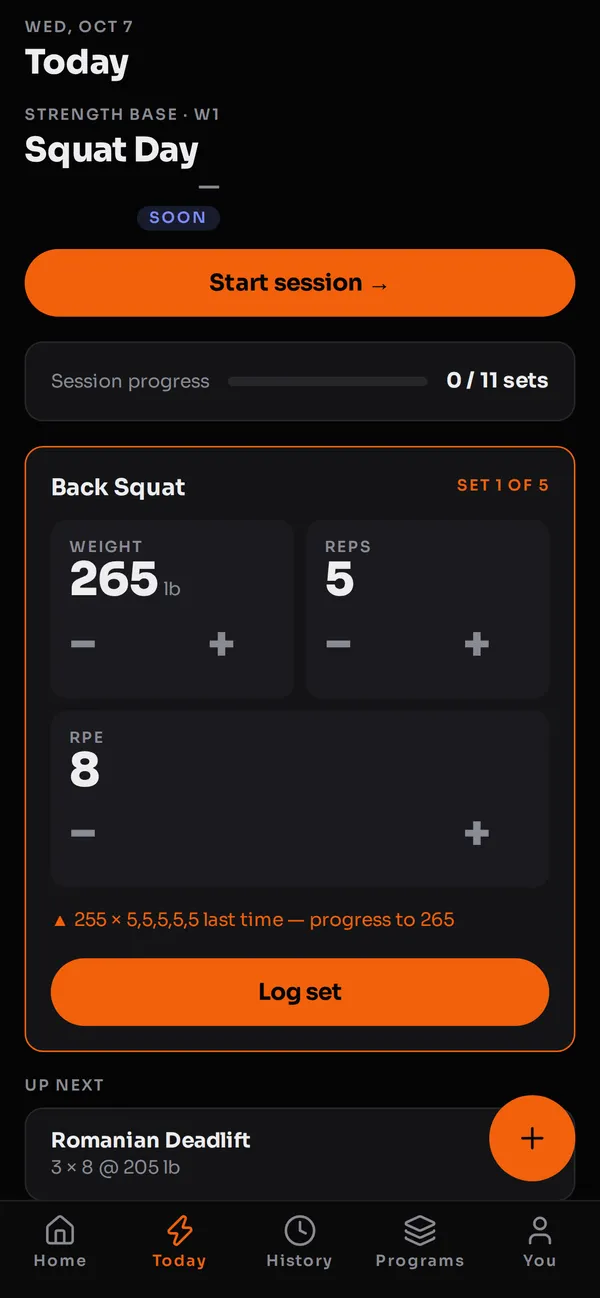
Trackers lose your history. This one can't overwrite it.
Accounts close. Exports fail. An edit replaces the number you lifted with the one you typed later.
In GrindOS every record is append-only. A correction adds a row beside the original, so the original stays in the record. Charts and PRs use the corrected number.
Don't take our word for it. Log a set, then try to change it.
Live demo · not saved
Back Squat
- Week 1 255 × 5 298 e1RM
- Week 2 260 × 5 303 e1RM PR
One system for four kinds of training.
Strength
Sets, reps, load. PRs detected from the record.
Metcons
For time, AMRAP, max load. Scored and kept.
Cardio
Runs, rows, bike. Pace, splits, heart rate.
Mobility
Holds and routines, timed and logged.
Bring the program you already follow.
Import a workout PDF or a TrainingPeaks CSV. GrindOS reads it in your browser, shows you what it found and what it couldn't, and writes nothing until you confirm. Add your calendar's busy times too.
Once it's in, every day, workout and block can be copied, so last month's week becomes this month's.
-
DAY 1 · LOWER -
Barbell Back Squat ....... 4 x 6-8 -
Romanian Deadlift ........ 3 x 8-12 -
Walking Lunge ............ 3 x 10-12 -
Plank .................... 3 x 45 sec hold -
Finisher: see coach videonot read -
DAY 2 · UPPER -
Barbell Bench Press ...... 4 x 6-8 -
Pull-Up .................. 3 x 6-10 -
Single Arm Dumbbell Row .. 3 x 10-12 -
SAMPLE TRIGGER SESSIONskipped
Import
Nothing is written until you confirm.
1 week · 2 days · 2 workouts · 0 rest days
Day 1 · Lower
- Back Squat4 × 6–8
- Romanian Deadlift3 × 8–12
- Walking Lunge3 × 10–12
- Plank3 × 45 s hold
Day 2 · Upper
- Bench Press4 × 6–8
- Pull-Up3 × 6–10
- Dumbbell Row3 × 10–12
Worth knowing
- 1 row couldn’t be read: "Finisher: see coach video" (p.1). It is not imported.
- Barbell Back Squat will log as Back Squat; Single Arm Dumbbell Row will log as Dumbbell Row.
- 1 section was not imported (Sample Trigger Session; 1 row) — sample trigger sessions and home mods are yours to design.
Workout PDFs import on the web app. Loads stay yours to set.
-
Title,WorkoutType,WorkoutDescription,…,WorkoutDay -
Easy Aerobic Run,Run,5:00 in Zone 1 25:00 in Zone 2 10:00 @ CV …,2026-09-01 -
Read Me First - Welcome to Your Plan,Other,"Welcome to your plan…",2026-09-01skipped -
Speed Intervals,Run,5:00 in Zone 1 6 x 0:20 in Zone 5/1:40 in Zone 2 …,2026-09-02 -
Recovery Jog,Run,"Take it nice and easy today…",2026-09-03kept as text -
Rest,Day Off,,2026-09-04
Import
Nothing is written until you confirm.
1 week · 4 days · 3 runs · 1 rest day
Week 1
- Tue 1 Sep · Easy Aerobic RunZone targets
- Wed 2 Sep · Speed Intervals6 × 0:20 Zone 5
- Thu 3 Sep · Recovery JogOriginal text
- Fri 4 Sep · Day OffRest
Worth knowing
- 1 non-training row will be skipped.
- 1 description couldn’t be read — it imports as its original text, not as targets.
Runs keep their zone targets, step by step.
-
BEGIN:VEVENT -
DTSTART:20261103T090000 · DTEND:20261103T100000 -
SUMMARY:Dentistnever read -
BEGIN:VEVENT -
DTSTART:20261104T170000 · DTEND:20261104T183000 -
RRULE:FREQ=WEEKLY;BYDAY=WE -
SUMMARY:School pickupnever read -
BEGIN:VEVENT -
DTSTART;VALUE=DATE:20261105skipped -
SUMMARY:Sam’s birthdaynever read
Calendar import
Only start and end times are read — titles, people and places never leave this page.
5 busy blocks across 5 days
Busy
- Tue 3 Nov09:00–10:00
- Wed 4 Nov17:00–18:30
- Wed 11 Nov17:00–18:30
- Wed 18 Nov17:00–18:30
- Wed 25 Nov17:00–18:30
Skipped
- 1 all-day — an all-day event says what the day is, not whether you can train
Busy times cover the next 28 days and land in your availability as blocked hours.
Progress you can hold.
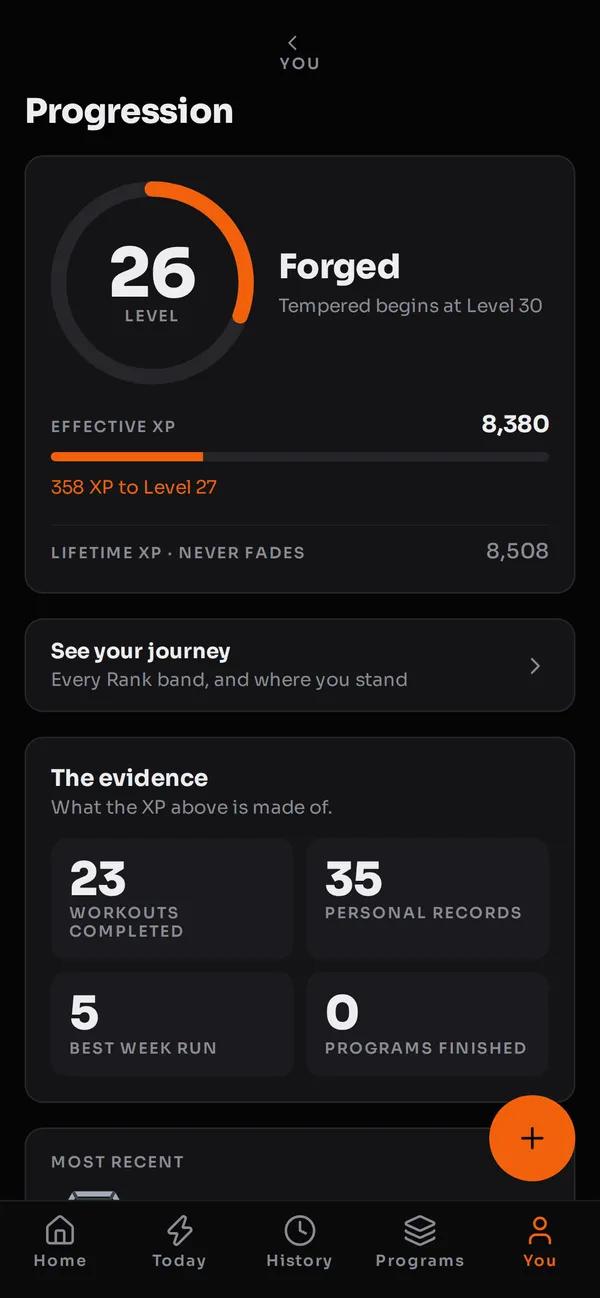
Every finished session earns toward your level. Badges are forged in materials, not colors: Raw, Iron, Steel, Titanium, and beyond. Levels and ranks mark the journey; badges mark the work that stays done.


Runs from Apple Health.
Runs recorded by Apple Health can appear in your GrindOS history next to everything else. The iPhone app (in beta through TestFlight) reads them straight from Apple Health; on the web, a one-time Health Auto Export link does the same.
- ThuOct 8 Squat Day Back Squat 5 × 5 · 260 lb 303 lb
- WedOct 7 Morning RunApple Health 5.1 mi · 42:10 · 8:16 /mi · 148 bpm 5.1 mi
- TueOct 6 12 min AMRAP Wall Ball · Box Jump · Burpee 7 + 11
Questions
Is it free?
Yes, during the beta. Pricing comes later and beta members hear first.
What platforms?
Web today, installable as a PWA, and an iPhone app in beta through TestFlight. Beta invites go out by email.
Does it replace btwb?
For personal logging and programming, yes. No gym management.
Who owns my data?
You do. Records are append-only, so a correction adds a row and never replaces one, and you can ask for your account and data to be deleted at any time.
When does access open?
In small groups, by email invite. No date promised.
Get in early.
Access opens in waves. Free while it does.